Establishing Seamless PostgreSQL Connectivity in Java using JDBC: A Comprehensive Guide (2025/2026 Model)

The PostgreSQL JDBC (Java Database Connectivity) driver is a robust and freely available API that allows Java applications to interact directly with the PostgreSQL database system. Leveraging this driver, developers can integrate PostgreSQL into their Java projects, enabling the execution of complex SQL queries and various database operations directly from the application layer.
This guide provides an authoritative, step-by-step implementation plan for establishing a reliable connection between a PostgreSQL database and a modern Java application.
Establishing PostgreSQL-Java Connectivity: A Step-by-Step Methodology
To successfully link your Java application with PostgreSQL using JDBC, the following procedural steps must be executed:
- Integration of the PostgreSQL JDBC Driver
- Programming the Database Connection
- Executing Database Manipulation Queries
Step 1: Integrating the PostgreSQL JDBC Driver with Your Java Project
The first critical step involves embedding the JDBC driver into your Java project's build path. This can be achieved through two primary methods: using a project management tool like Maven or manually adding the JAR file.
Method A: Utilizing Maven Dependency (Recommended)
For most contemporary Java projects, integrating the driver via a Maven dependency is the most straightforward and maintainable approach. Add the following dependency snippet to your project's pom.xml file:
Method B: Manual JAR File Integration
If you are not using a build tool, you must manually download the required JDBC JAR file from the official PostgreSQL JDBC website. Once downloaded, you must add this JAR file to your Java application’s build path. The typical procedure involves accessing your project's properties and adding the external JAR:
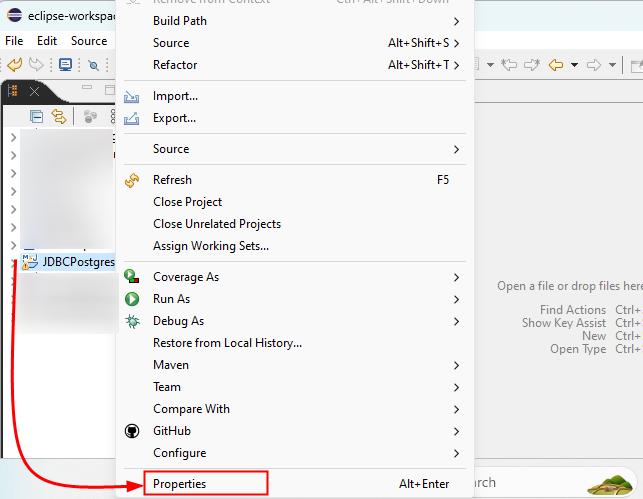
Navigate to the "Libraries" or "Build Path" section, and use the "Add External JARs..." option. A file selection window will prompt you to locate and select the downloaded driver JAR file.
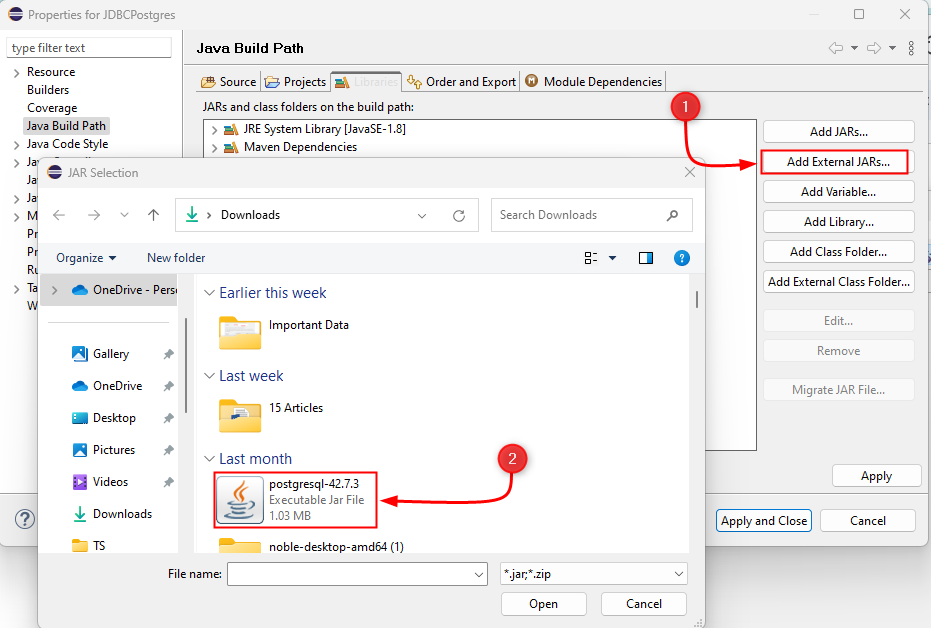
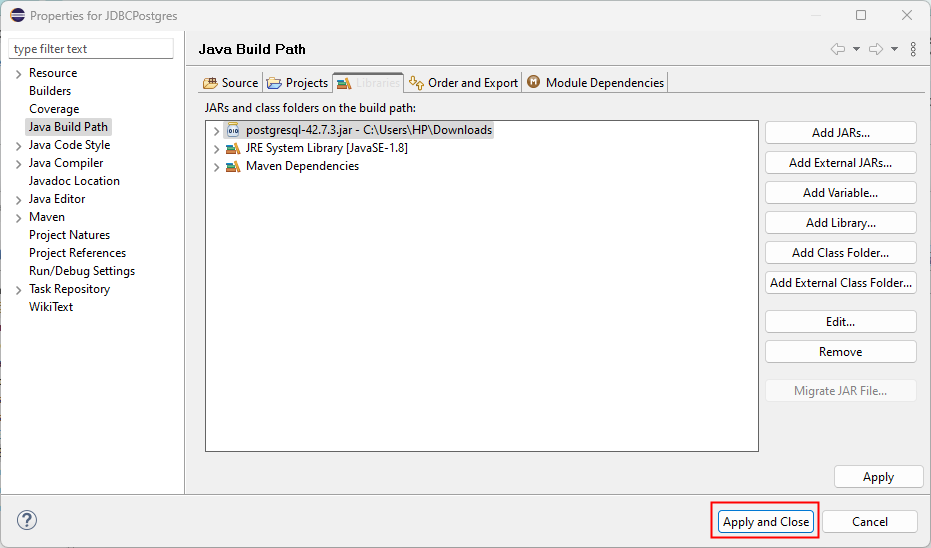
Finalize the process by confirming the addition and closing the properties window to apply the changes.
Step 2: Programming the Database Connection
With the JDBC driver successfully integrated, the next step is to programmatically establish the connection using the DriverManager class from the java.sql package. The following Java code snippet demonstrates the fundamental connection logic:
import java.sql.*;
Key components of the connection code:
- Import: The `java.sql.*` package provides all necessary classes for database interaction.
- Connection Details: String variables are defined for the JDBC URL (`jdbc:postgresql://localhost:5432/postgres`), database username, and password.
- Driver Registration: `Class.forName("org.postgresql.Driver")` explicitly loads and registers the PostgreSQL JDBC driver.
- Connection Establishment: `DriverManager.getConnection(connect, user, pwd)` attempts to establish the physical connection within a try-with-resources block for automatic resource closure.
Successful execution of this code will yield the following output, confirming the connection:

Step 3: Executing Database Queries (SELECT and DDL)
Once the connection is secured, the application can execute various PostgreSQL commands, ranging from data retrieval (DQL) to data definition (DDL).
Executing Data Retrieval Queries (SELECT)
To run a `SELECT` query, you must first create a `Statement` object from the active connection. The `executeQuery()` method is then used to send the DQL command, which returns a `ResultSet` object containing the retrieved data.
Statement sql_statement = conn.createStatement();
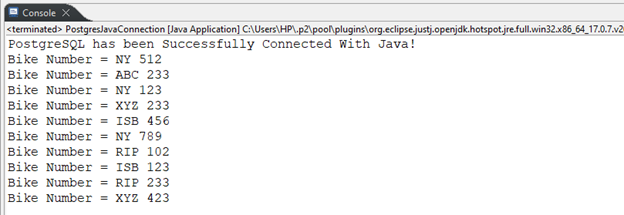
This code iterates through the `ResultSet` using a `while` loop combined with the `next()` method, printing the value of the "bike\_number" column for each record found in the `bike_details` table.
Executing Data Definition Queries (CREATE TABLE)
Queries that modify the database structure (DDL), such as `CREATE TABLE`, are executed using the `execute()` method of the `Statement` object. The following example creates a new table named `cp_table` with four defined columns:
Statement sql_statement = conn.createStatement();
Upon successful execution, the console confirms the creation of the new table, demonstrating the capability to run DDL commands from the Java application.

This methodology can be extended to execute virtually any PostgreSQL command or query needed to perform comprehensive database operations.
Final Summary and Outlook
The PostgreSQL JDBC driver is the indispensable component for bridging the gap between Java and PostgreSQL databases. Integration can be quickly achieved through a Maven dependency or by manually adding the driver JAR file to the project's build path.
Once integrated, developers utilize the `DriverManager.getConnection()` method to establish a connection session. Subsequently, `Statement` objects are employed to execute SQL commands, enabling the Java application to seamlessly perform complex tasks such as data retrieval (SELECT) and schema modification (DDL), making Java a powerful client for PostgreSQL database management and application development.
Frequently Asked Questions (FAQ) on JDBC and PostgreSQL
Q: What is the primary role of the PostgreSQL JDBC driver?
A: The primary role is to serve as a Type 4 driver (a pure Java driver) that translates Java's generic JDBC calls into the native protocol used by the PostgreSQL database, allowing Java code to execute SQL and retrieve results.
Q: Why is the `Class.forName()` call still used in some examples?
A: In modern Java versions (Java 6 and later), the driver is usually loaded automatically via the Service Provider Interface (SPI), making `Class.forName("org.postgresql.Driver")` technically redundant. However, it is often included in legacy or older examples to ensure explicit loading, especially in older application servers or environments.
Q: What is a secure alternative to hardcoding passwords in the Java code?
A: Production applications should never hardcode credentials. Secure alternatives include using environment variables, external configuration files (e.g., Spring properties), or a specialized secrets management system (like Vault or Kubernetes Secrets) to inject credentials at runtime.
Posting Komentar untuk "Establishing Seamless PostgreSQL Connectivity in Java using JDBC: A Comprehensive Guide (2025/2026 Model)"